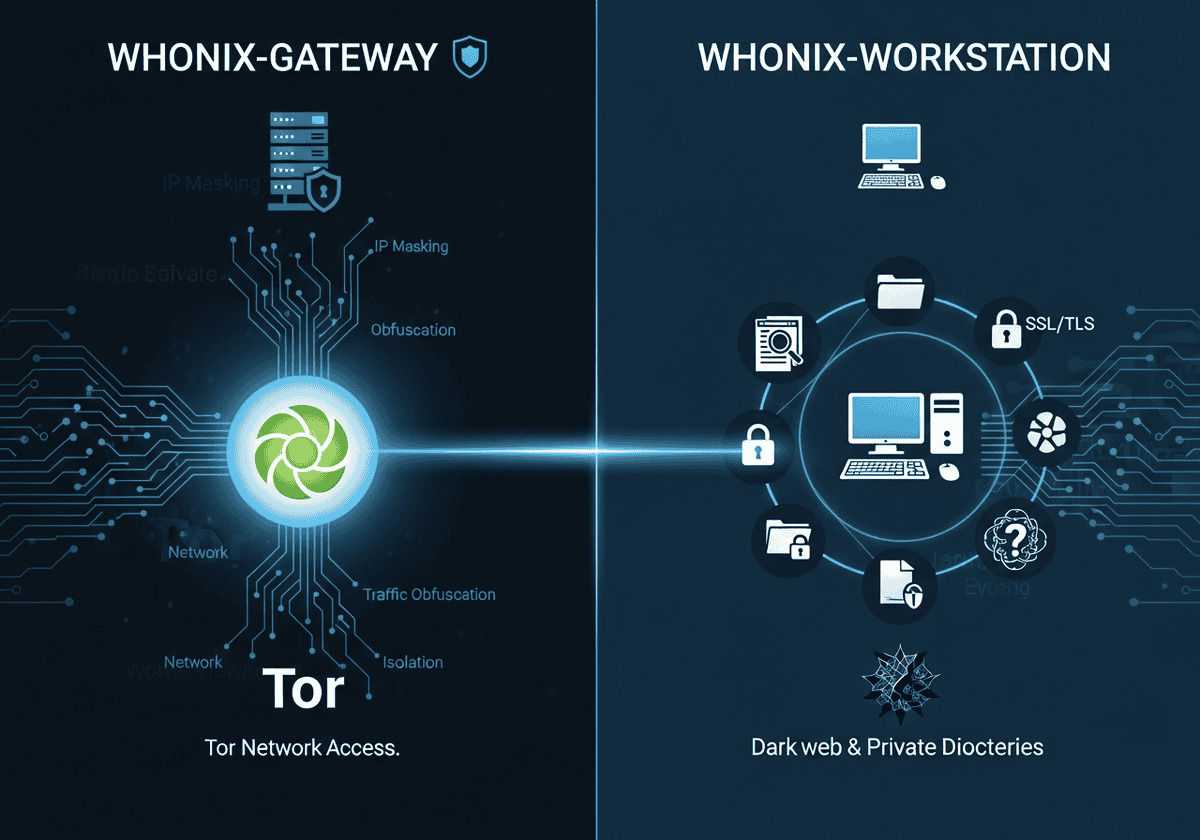

Modern deanonymization techniques have rendered application-layer proxying insufficient, as sophisticated malware and misconfigured software frequently bypass local network settings to expose underlying IP addresses and hardware identifiers.
Whonix addresses these vulnerabilities through a dual-VM architecture that architecturally separates the network gateway from the user workstation, effectively eliminating IP leaks and DNS hijacking through mandatory Tor routing and application-level stream isolation.
本稿では、Whonixフレームワークの技術的な分解を行い、コンパートメント化によるセキュリティの実装とサイドチャネル攻撃の軽減に焦点を当てます。IDの相関関係を防ぎ、異なるセッション間で一貫した匿名性プロファイルを維持するために使用される基盤となるメカニズムを検証し、仮想化インフラストラクチャ内での高度な監視に対するプラットフォームの耐性を評価します。
私たちは、ID の関連付けを防止し、異なるセッション間で一貫した匿名性プロファイルを維持するために使用される基盤となるメカニズムを調査し、仮想化インフラストラクチャ内の高度な監視に耐えるプラットフォームの能力を評価します。


Key Take-Aways

- Dual-VM architecture: separates the network gateway from the user workstation to prevent leaks.
- IP leak prevention: the workstation has no knowledge of your real IP address.
- Mandatory Tor routing: all workstation traffic is forced through the Tor network by the gateway.
- Security by isolation: compromising an application does not reveal your network identity.
- Secure time sync: uses sdwdate to prevent deanonymization via clock skew or time zones.
- Hardware masking: hides real hardware serial numbers and MAC addresses from the guest OS.
- DNS leak protection: automatically routes all DNS queries through the Tor network.
- Tor browser integration: includes a pre-configured Tor Browser for standardized web anonymity.
- Data persistence: designed to save files and configurations across reboots unlike amnesic systems.
- Malware resistance: root-level malware in the workstation cannot bypass the gateway’s Tor enforcement.
- No Tor over Tor: running a second Tor client inside the workstation is discouraged and risky.
Whonix in Short
Whonix is a specialized, Debian-based operating system designed for advanced anonymity and security through a unique dual-virtual machine (VM) architecture. Unlike standard privacy tools that run as applications within a host OS, Whonix splits its operations into two distinct components:
- the Whonix-Gateway: runs the Tor process and acts as a transparent プロキシ
- the Whonix-Workstation: provides a sandboxed environment for user activities such as web browsing, document editing, and communications.

These two VMs are linked via an isolated internal virtual network, ensuring that the Workstation has no direct path to the physical network interface of the host machine and can only communicate with the outside world through the Gateway’s Tor circuit.
The primary technical advantage of this design is the mitigation of “de-anonymization” attacks and DNS leaks. Because the Workstation is architecturally unaware of the host’s real IP address or MAC address, even a sophisticated malware infection with root privileges cannot “phone home” to reveal the user’s true identity.
Furthermore, Whonix implements Stream Isolation, which ensures that different applications (such as a web browser and an email client) use separate Tor circuits to prevent identity correlation. By forcing all traffic—including system updates and background processes—through the Tor network at the operating system level, Whonix provides a “fail-safe” environment that is significantly more robust than using the Tor Browser on a standard, non-hardened operating system.
長所
| 短所
|
Whonixの代替案

Selecting the appropriate privacy tool requires a clear understanding of whether your goal is simple data 暗号化, anonymous web browsing, or a comprehensive high-security environment.
以下の比較では、匿名性、情報漏洩防止、使いやすさといった主要な指標に基づいて、VPN、Torブラウザ、Whonixを評価し、お客様のニーズに最適なソリューションを見つけるお手伝いをします。
| VPN(仮想プライベートネットワーク) | Torブラウザ | Whonix(オペレーティングシステム) | |
| 主な目標 | プライバシーと位置情報偽装 | 匿名性と検閲回避 | 最大限のセキュリティと漏洩防止 |
| 仕組み | 単一の暗号化された「トンネル」を通して、プロバイダが所有するサーバーへトラフィックをルーティングします。 | ランダムに配置された3つのボランティアノード層(入口、中間、出口)を経由してトラフィックをルーティングします。 | 「ゲートウェイ」VMはすべてのOSトラフィックをTor経由で強制的に処理し、「ワークステーション」VMはアプリケーションを実行します。 |
| 匿名性レベル | 低~中程度。 VPNプロバイダーはあなたの実際のIPアドレスを知っており、あなたの通信内容を見ることができます。 | 高い。 単一のノードがあなたのIPアドレスと宛先の両方を知っていることはありません。 | 非常に高い。 ブラウザがハッキングされた場合でも、「匿名解除」を防ぐように設計されています。 |
| IP漏洩防止 | 基本。 VPN接続が切断された場合、(「キルスイッチ」を使用しない限り)実際のIPアドレスが漏洩する可能性があります。 | 良い。 ブラウザ内部の通信のみを保護します。他のアプリはあなたの実際のIPアドレスを漏洩します。 | 合計。 ワークステーションがあなたの実際のIPアドレスを認識することは、アーキテクチャ的に不可能です。 |
| スピード | 速い。 4Kストリーミング、ゲーム、大容量ファイルのダウンロードに適しています。 | 遅い。 トラフィックは世界中を飛び回るため、高い遅延が発生し、Torネットワークの速度によって制限される。 | |
| 使いやすさ | とても簡単です。 ワンクリックで全てのデバイスに対応するアプリに接続できます。 | 簡単。 標準的なウェブブラウザ(Firefoxベース)と同様に動作します。 | 難しい。 VirtualBox/KVMと仮想マシンに関する知識が必要です。 |
| 信頼モデル | 集中管理。 VPNプロバイダーがあなたのデータをログに記録しないと信頼する必要があります。 | 分散型。 特定の個人や組織を信頼する必要はありません。 | 分散型。 TorとオープンソースLinux(Debian)をベースに構築されています。 |
| 料金 | 通常は、評判の良い「ログなし」サービスに対して料金を支払います。 | 無料。 | 無料。 |
Qubes OS で?
The fundamental difference between Qubes OS and Whonix lies in their primary security objectives:, while
- Qubes OS focuses on security through isolation: ユーザーがデジタルライフを「仕事」、「個人」、「銀行」などの個別の仮想マシン(キューブ)に分割できる「タイプ1」ハイパーバイザーベースのオペレーティングシステム。いずれかのキューブがマルウェアに感染した場合でも、隔離によって攻撃者が他のキューブのデータにアクセスできないことが保証されます。
- Whonixは、匿名化(Torification)を通じて匿名性を確保することに重点を置いている。 ユーザーのIPアドレスを隠蔽し、ネットワークレベルでの追跡を防止するために特別に設計された2台の仮想マシンの特殊な構成。
Qubesは様々な状況下でローカルデータの整合性を保護する一方、Whonixは外部インターネットからユーザーの身元を保護します。
この2つのシステムは、Whonix-on-Qubesとして知られる高度な技術的相補性によって、その潜在能力を最大限に発揮します。 in this integration, Whonix is not run inside a third-party application like VirtualBox; instead, it is baked directly into the Qubes 生態系 as a set of “TemplateVMs.” Qubes replaces the standard Linux networking stack with a Whonix-Gateway ProxyVM, which forces all traffic from a designated Whonix-Workstation AppVM through the Tor network.
この構成は、標準的な Whonix のインストールよりもはるかに安全です。なぜなら、Qubes は Xen ハイパーバイザーを使用しており、これは一般消費者向けの仮想化ソフトウェアよりもはるかに「突破」が困難だからです。これにより、Qubes がタスク間の「壁」を提供し、Whonix がネットワーク トラフィックの「クローク」を提供するという、多層防御が実現されます。
単純な統合にとどまらず、これら2つのプラットフォームの組み合わせにより、どちらか一方だけでは実現できなかった高度なセキュリティワークフローが可能になります。中でも特筆すべきは、使い捨てのWhonix VMです。Qubesでは、ユーザーは単一セッションのみ存在するWhonixワークステーションを起動できます。アプリケーションまたはVMが閉じられると同時に、マルウェアやフォレンジック痕跡を含む環境全体がシステムから即座に削除されます。これにより、Tails(ライブOS)の「記憶喪失」特性と、Qubesの永続的で高隔離なハードウェアセキュリティが両立します。
要約:Whonixを使うべき時

- あなたは、リスクの高い情報を扱うジャーナリスト、内部告発者、または研究者です。
- あなたは、マルウェアが「外部サーバーに電話をかけて」あなたの実際のIPアドレスを漏洩させようとするのではないかと心配しています。
- 匿名で利用するには、ブラウザ以外のアプリケーション(メールクライアントやチャットアプリなど)を使用する必要があります。
結論:最高のセキュリティとプロフェッショナルレベルの匿名性を求めるなら、これが最適。
For text chat over Tor, a free irc client configured on the Workstation, or an online irc client opened in the browser, can reach IRC networks without exposing the real address. Newcomers can start with a few irc commands such as join and msg, and read how to use irc before connecting.
よくある質問
What is the core architecture of Whonix?
Whonix uses a dual-VM design consisting of a Gateway that handles all Tor connections and a Workstation for user applications. This separation ensures that the Workstation never knows the user’s real IP address or hardware serial numbers.
How does Whonix prevent IP leaks even if an application is compromised?
Since the Workstation has no direct access to the internet and can only communicate through the Gateway, even root-level malware cannot discover or broadcast your real IP. All traffic is forcibly routed through the Tor network by the Gateway’s firewall rules.
Why does Whonix use two separate virtual machines instead of one?
Using two VMs creates a “security by isolation” barrier that prevents network-level leaks and local hardware identification. If the application layer in the Workstation is breached, the network layer in the Gateway remains isolated and secure.
Can I use Whonix if my host operating system is infected with malware?
No, because the host operating system and its hypervisor have total control over the virtual machines. If the host is compromised, an attacker can log keystrokes, take screenshots, or manipulate the Whonix VMs directly.
How is Whonix different from the Tails operating system?
Tails is a live “amnesic” OS designed to leave no trace on a computer’s hard drive, while Whonix is designed for persistent use within a virtualized environment. Whonix offers stronger protection against certain types of de-anonymization attacks due to its split-VM architecture.
Is it safe to use a VPN with Whonix?
While possible, adding a VPN increases complexity and can potentially introduce new attack vectors or “tunnel vision” risks. It is generally only recommended for advanced users who need to hide Tor usage from their ISP or access services that block Tor.
What is “Stream Isolation” and why is it important in Whonix?
Stream isolation forces different applications to use separate Tor circuits so that their traffic cannot be easily correlated by an exit node. This prevents an observer from linking your web browsing session to your background email syncing or other activities.
Why is the system time in Whonix different from my local time?
Whonix uses UTC and a tool called sdwdate to synchronize time securely via タマネギ services rather than insecure NTP servers. This prevents “time attacks” where an adversary uses clock skew or local time zones to identify your physical location.
Can I run Whonix on a USB drive like Tails?
Whonix is not primarily designed as a live bootable USB, though it can be installed on an external drive and run via a host OS. For a true “plug-and-play” amnesic experience on any hardware, Tails remains the standard choice.
Does Whonix protect me from browser fingerprinting?
Whonix includes the Tor Browser, which is specifically patched to provide a uniform fingerprint shared by millions of other users. By running it within the standardized Workstation environment, you further reduce the unique hardware identifiers available to websites.
Why is it discouraged to run a Tor client inside the Whonix-Workstation?
Running “Tor over Tor” creates a nested circuit that significantly degrades performance and can lead to unpredictable routing behavior. It does not provide “double anonymity” and may actually make your traffic patterns more distinct to network observers.
Related Readings & Concepts (experts)
- Tor network: a decentralized anonymity network that routes your traffic through three random relays to conceal your identity and location from observers.
- Virtualization: the technology used to run Whonix’s two-VM architecture, providing a layer of separation between the guest operating systems and your physical hardware.
- Operational Security (OpSec): the set of habits and procedures you must follow to prevent revealing your identity through behavioral patterns or accidental data leaks.
- Pseudonymity: the use of a persistent but non-identifying alias, which requires careful management in Whonix to avoid linking different online identities together.
- Stream isolation: a feature that forces different applications to use different Tor circuits, preventing an observer from correlating your activities across various services.
- Transparent Proxying: a mechanism where the Gateway automatically intercepts and routes all Workstation traffic through Tor, even for applications not natively configured for it.
- DNS leak: a security flaw where your domain name requests bypass the anonymity network, potentially revealing your browsing history to your ISP.
- IP leak: a critical failure where your real, deanonymizing IP address is exposed to a destination server or an eavesdropper.
- Browser fingerprinting: a tracking technique that identifies you based on unique browser configurations, which Whonix mitigates by providing a standardized environment.
- Tor over Tor: a problematic configuration where a Tor client is run inside a system already routed through Tor, which can lead to performance issues and unpredictable security risks.
- Tor bridges: private Tor relays that are not listed in the public directory, used to bypass censorship in regions where the Tor network is blocked.
- Entry guards: the first relays in a Tor circuit that are specifically chosen for their long-term stability to protect users against certain types of deanonymization attacks.
- Onion services: websites or services that end in .onion and are hosted entirely within the Tor network, providing end-to-end encryption and metadata protection.
- Identity correlation: the risk of an adversary linking different sessions or accounts to the same person by observing shared identifiers or consistent behavioral traits.
External Links on Whonix
国際規格
(リンクにカーソルを合わせると、コンテンツの説明が表示されます)