Product Design, Manufacturing & Innovation Resources
Home » Online Tools » Free LaTex Formula Editor

Free LaTex Formula Editor

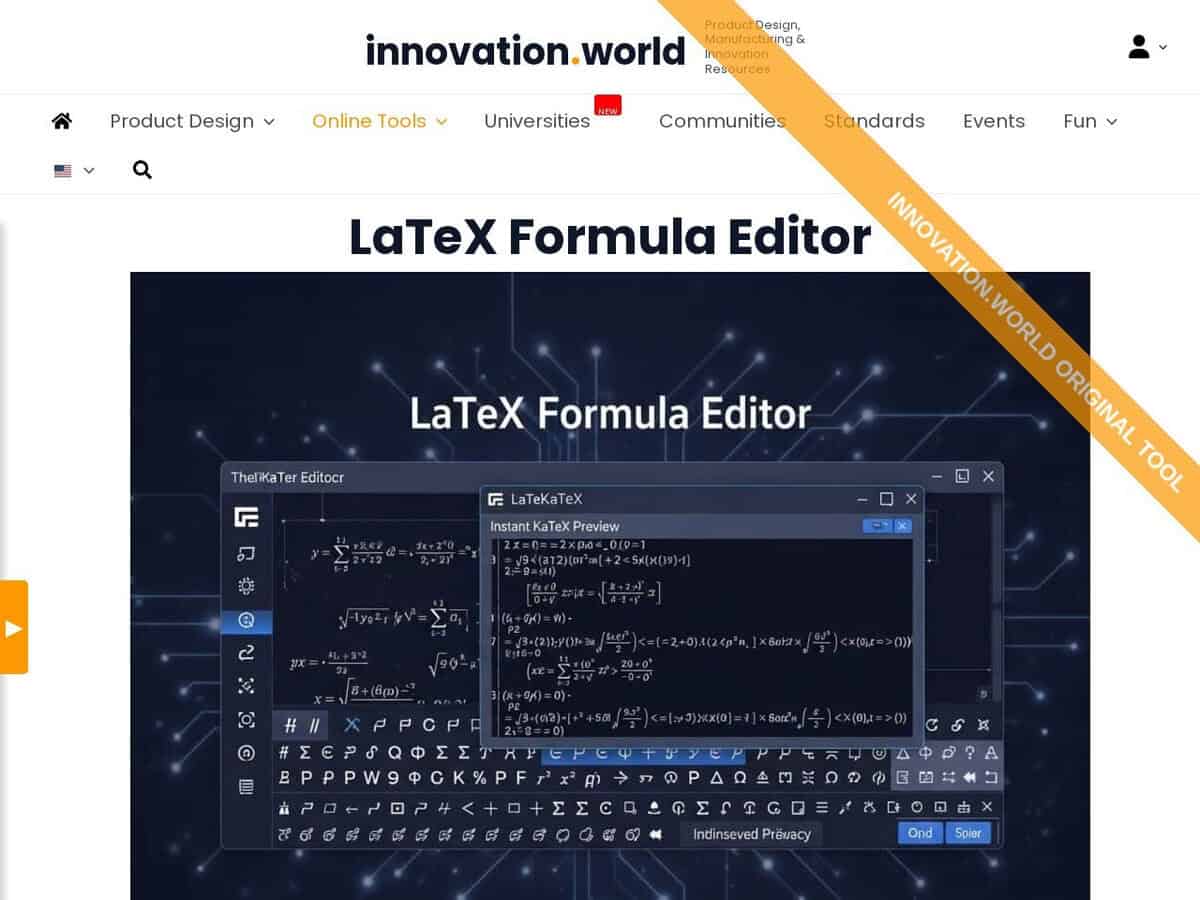
While several LaTeX editors are available online, not many are specialized in Latex math formulas, efficient, all math functions, Greek letters and extensive support … and advert-free … so we decide to make our own and propose it here for free: ours provides a browser-based interface for constructing complex mathematical and scientific equations using LaTeX syntax. It features a real-time rendering engine that visualizes code inputs instantly, allowing users to verify syntax accuracy before implementation.

The tool includes a library of symbols, operators, and functions accessible via a graphical menu, which simplifies the creation of matrices, integrals, and Greek characters. Users can export the final rendered formulas as high-resolution image files or vector graphics for integration into external documents and digital platforms.

Just edit or copy/paste the formula’s Latex code once it is generated, with direct rendering.

Engineers and scientists utilize this editor to standardize technical documentation and research papers where precision in mathematical notation is critical. In innovation and manufacturing environments, professionals apply the tool to:

  • Document proprietary algorithms and physical models within technical specifications.
  • Embed clear, scalable formulas into quality control manuals and standard operating procedures.
  • Generate visual representations of complex calculations for patent applications and R&D reports.

By providing a bridge between raw LaTeX code and visual output, the service ensures that technical communications remain legible and mathematically rigorous across cross-functional teams.
Disciplines: Mathematics, Physics, Scientific publishing, Education, Engineering.
Free alternative to Overleaf, MathType, Microsoft Equation Editor.
Free LaTeX Formula Editor compared with Overleaf, MathType and Microsoft Equation Editor
Free LaTeX Formula EditorOverleafMathTypeMicrosoft Equation Editor
Scope: The editor is limited to LaTeX math formulas in the browser, with an instant preview rendered by KaTeX. It handles single formulas, not complete documents.Scope: Overleaf is a full online LaTeX editor with real-time collaboration, version control and hundreds of templates. It is meant for whole documents, so it is heavier than a formula-only tool.Scope: MathType is an equation editor that works inside Word, PowerPoint, Google Docs, Google Slides and WPS. It also integrates with learning management systems, XML editors and HTML editors.Scope: The equation tool is built into Word and other Office applications, so formulas live inside the document being written.
Input method: Formulas are typed as LaTeX code. Toolbar snippets insert fractions, roots, sums, integrals, limits, matrices, cases and aligned equations, and drop-down menus insert Greek letters.Input method: Content is written as LaTeX source in a document project.Input method: Formulas are built from a visual toolbar with 500+ symbols, including matrices and multiline equations. An AI handwriting tool converts handwritten math on touch devices, and a ChemType toolbar covers chemistry formulas.Input method: Word accepts linear input in UnicodeMath or LaTeX, started with Alt+=. LaTeX input is available only in Word for Microsoft 365, other Office applications accept UnicodeMath only, and \begin{} and \end{} are not supported, so matrices use \matrix{}.
Cost and access: The editor is free. The formula is rendered in the browser and nothing is transmitted to the site. Full-size images and downloads are free but require registration.Cost and access: The free plan allows one editor collaborator and about 24 hours of project history, and it has no Git integration. Paid plans add full history, Git and GitHub sync, and track changes in some tiers.Cost and access: A 30-day free trial of MathType for Office Tools is offered, followed by a paid licence.
Export and file handling: The tool imports and exports .tex files and has a Copy button for the LaTeX markup. A LaTeX engine or import tool is needed to reuse the exported code elsewhere.

Topics covered: LaTeX, mathematical equations, real-time rendering, syntax accuracy, symbols library, operators, functions, matrices, integrals, Greek characters, high-resolution images, vector graphics, technical documentation, precision, algorithms, quality control, visual representations, cross-functional teams, ISO 80000, ISO/IEC 80000-2, ISO 31, ISO/IEC 24765, and ISO 9001..

More Calculation, innovation.world, Text Related tools

Suggest your best online tool:

Do you know a better, a complementary or a replacement website to the one listed above ?

> Suggest it here <

10th year anniversary

Full size images and downloads are only available, 100% free, for registered members.

> Login <