APCA Contrast Calculator compared with WebAIM Contrast Checker, Stark and Figma contrast plugins| APCA Contrast Calculator | WebAIM Contrast Checker | Stark | Figma contrast plugins (typical) |
|---|
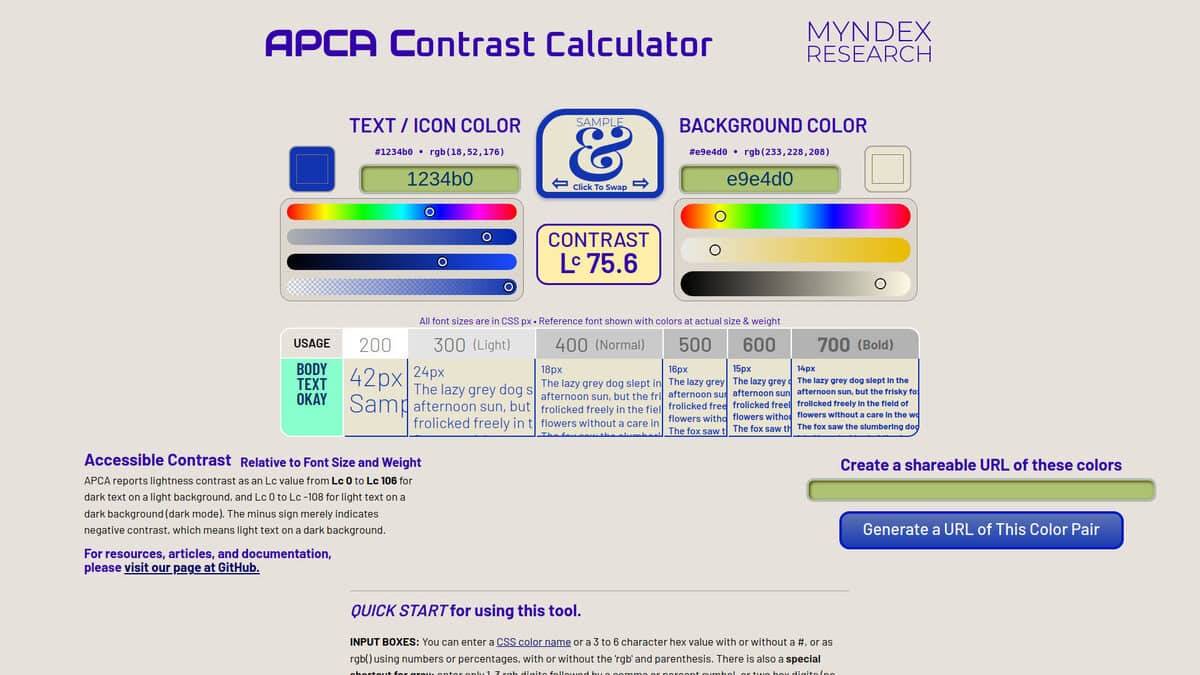
| Contrast model: It returns Lc, a signed value from the Accessible Perceptual Contrast Algorithm, roughly -108 to 106. Text and background must go in the correct boxes because polarity matters, and the sign only indicates polarity. | Contrast model: It computes the WCAG 2 contrast ratio between foreground and background colors. | Contrast model: It checks contrast against the AA and AAA levels based on WCAG. APCA is supported in beta in Figma and in the browser extensions, and you can switch between the two displays. | Contrast model: Zebra, one plugin checked, shows APCA alongside WCAG 2 scores. Other plugins were not checked. |
| Inputs and outputs: Inputs are CSS color names, hex values and rgb() values, and text color can carry an alpha that is blended with the background. It outputs Lc, a sample preview at actual size and weight, a font size and weight lookup table, and a shareable link. | Inputs and outputs: Foreground and background are entered as hex values or chosen with a color picker with eyedropper, and alpha can be set. Appending the api parameter to a permalink returns JSON with the ratio and pass or fail states. | | Inputs and outputs: Zebra has tabs for minimum recommended font sizes per weight, APCA levels compared with WCAG scores, and an explanation of each APCA level. Colors are entered manually or taken from a selection. |
| Thresholds and status: The page marks the guideline levels and the font lookup table as preliminary or beta, and says APCA W3 is in public beta. APCA is being evaluated as a possible replacement for WCAG 2 contrast math but is not part of a published standard. | Thresholds and status: Normal text needs 4.5:1 for AA and 7:1 for AAA. Large text needs 3:1 for AA and 4.5:1 for AAA, and graphical objects and UI components need 3:1 for AA under WCAG 2.1. | | |
| Platform and delivery: It is a web page with a shareable URL for each color pair. A separate tool called Bridge PCA shows Lc and the WCAG 2 ratio together. | Platform and delivery: It is a web page, and a mini version can run on any page as a bookmarklet. A separate Link Contrast Checker covers links identified by color alone. | Platform and delivery: Contrast Checker and Color Suggestions are available in Figma and in browser extensions for Brave, Chrome and Edge. Firefox, Safari and Arc are also listed. | Platform and delivery: Zebra is a plugin that runs in Figma. |