Product Design, Manufacturing & Innovation Resources
Home » Online Tools » Wikipedia’s List of Blocked Domains

Wikipedia’s List of Blocked Domains

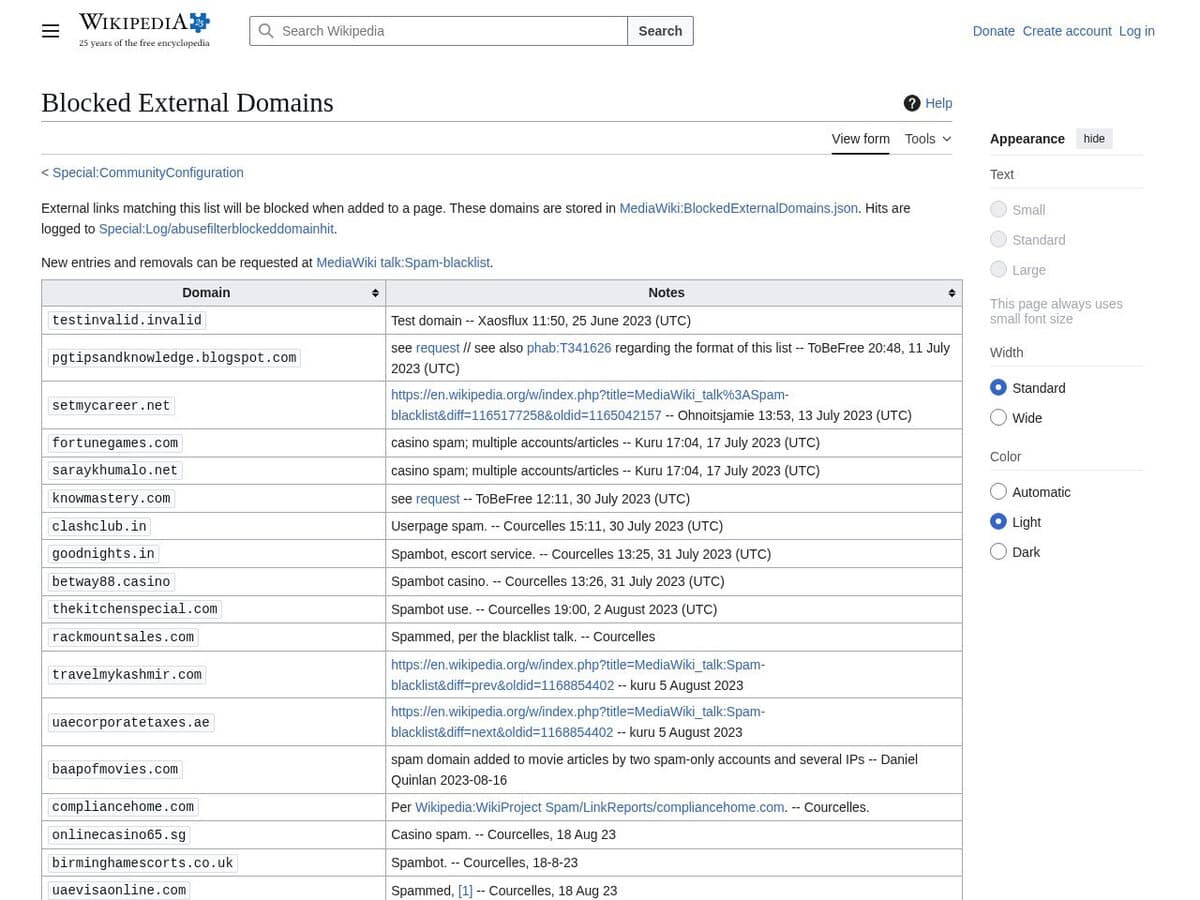
The own Wikipedia list of their blocked domains, do to link abuse. To be used for your own link spamming protection if needed

Their interface allows authorized community members to manage and update lists of blocked external domains—typically used for spam prevention or security filtering—without requiring direct modifications to the underlying server-side codebase. By utilizing a JSON-based configuration schema, the service ensures that domain blacklisting is handled transparently and can be audited, providing a scalable method for maintaining the quality and safety of outbound links across a large-scale collaborative environment.

Site owners and publishers can utilize this tool to enforce rigorous data provenance standards within technical wikis and documentation hubs. In engineering and manufacturing sectors, the tool is applied to:

  • Prevent the citation of unverified or non-compliant component specifications by blacklisting domains known for hosting obsolete or inaccurate technical data.
  • Mitigate supply chain vulnerabilities by blocking access to domains associated with unauthorized firmware or unvetted third-party software drivers.
  • Ensure regulatory compliance by restricting documentation to approved scientific repositories and official standards bodies.

Tip: unfortunately not a complete list of all link spammers. A good starting point.

Disciplines: SEO, Web publishing, Journalism, Content moderation.
Free alternative to Spamhaus DBL, Google Safe Browsing, SURBL.
Wikipedia List of Blocked Domains compared with Spamhaus DBL, Google Safe Browsing and SURBL
Wikipedia List of Blocked DomainsSpamhaus DBLGoogle Safe BrowsingSURBL
What is listed: Domains that may not be added as external links in wiki pages. Subdomains are blocked too, blocking is domain-wide, and regular expressions are not supported.What is listed: Domain names only, with no IP addresses. Entries are domains tied to spam, phishing, malware or botnet command and control, plus compromised legitimate hostnames.What is listed: URLs on lists of unsafe web resources kept by Google, covering social engineering sites (phishing and deceptive pages) and sites hosting malware or unwanted software.What is listed: Domains of malicious or abused websites found in the bodies of spam messages. The core dataset is called Multi.
Query method: On wikis that use the MediaWiki feature, the list is stored as MediaWiki:BlockedExternalDomains.json and can be read through the API with action=raw.Query method: A DNS query under dbl.spamhaus.org. A 127.0.1.x answer means listed (for example 127.0.1.2 spam, 127.0.1.4 phishing, 127.0.1.5 malware) and NXDOMAIN means not listed. Automated queries to the website are not allowed.Query method: The Lookup API receives full URLs by HTTP POST, so Google sees which URLs are checked. The Update API downloads hashed lists for local checks, which avoids that but needs a local database and URL canonicalisation.Query method: The public Multi dataset is queried at multi.surbl.org and returns a bit-encoded 127.0.0.X answer. Other datasets such as Fresh and HashBL are private.
Intended use: Stops editors from adding the listed links to wiki pages, and logs each blocked attempt. It protects a MediaWiki site, not a mail system.Intended use: Mail servers and DNS firewalls, with integrations for RPZ, SpamAssassin and Rspamd. It should not be configured as an IP based blocklist.Intended use: Client applications that warn users about unsafe URLs.Intended use: Filtering or tagging unsolicited messages based on links in the message body, as a complement to IP based filtering.
Maintenance and licence: Administrators add entries through a form with a notes field. Changes can take up to five minutes to take full effect.Maintenance and licence: Most listings are automatic and expire once the abusive activity stops.Maintenance and licence: The pricing page states that use of the Safe Browsing APIs is free of charge. The developer page states non-commercial use only and points to the Web Risk API for commercial use. It also carries a deprecation warning for version 4 with a migration guide.

More Network & Web tools

Suggest your best online tool:

Do you know a better, a complementary or a replacement website to the one listed above ?

> Suggest it here <

10th year anniversary

Full size images and downloads are only available, 100% free, for registered members.

> Login <