Falstad Electronic Circuit Simulator compared with LTspice, Multisim, PSpice and Proteus| Falstad Electronic Circuit Simulator | LTspice | Multisim | PSpice | Proteus |
|---|
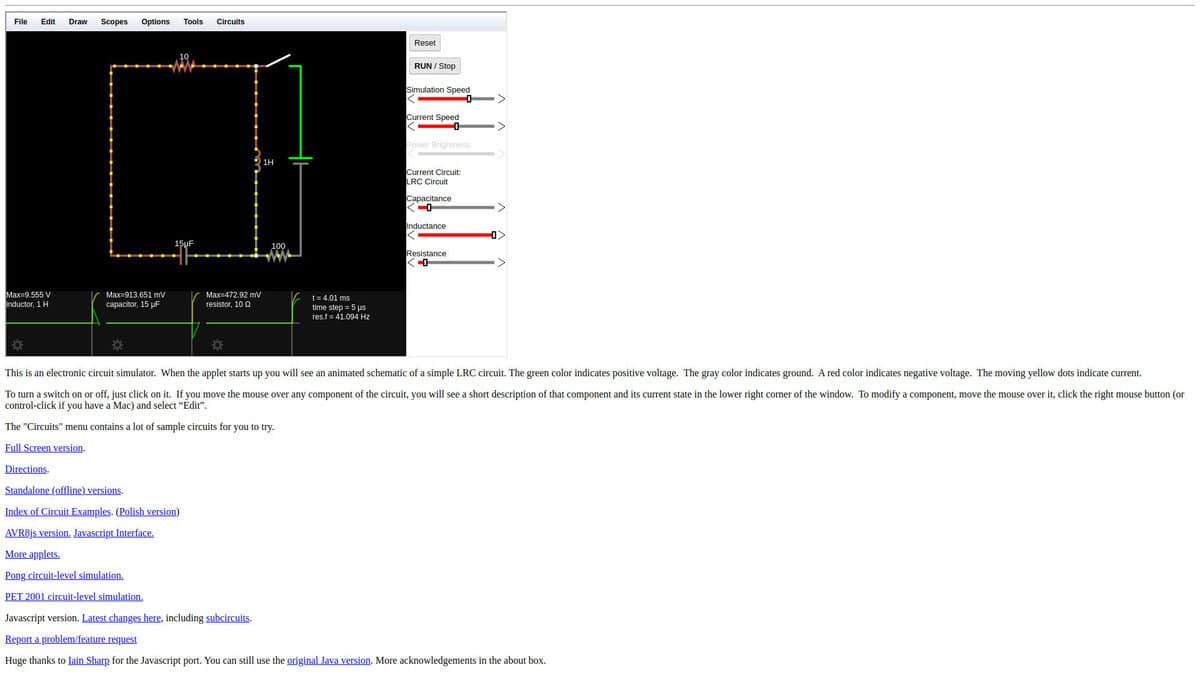
| Simulation scope: Circuits are animated while they run: green marks positive voltage, red negative voltage, and moving yellow dots show current. Switches respond to a click and values can be edited during the run. The page does not list analysis types. | Simulation scope: A SPICE simulator with schematic capture and a waveform viewer. Tutorials show transient, AC and noise analysis, and support for transformers and behavioral sources. | Simulation scope: SPICE simulation and circuit design for analog, digital and power electronics, aimed at education and research. The Designers edition adds PCB design tools. | Simulation scope: Core DC, AC and transient analysis, plus Monte Carlo, worst-case, sensitivity, smoke and noise analyses and parametric sweeps. Co-simulation with MATLAB and Simulink is listed. | Simulation scope: Mixed-mode SPICE run together with microcontroller firmware that executes on a chip model. The optional Advanced Simulation module adds frequency, distortion, noise and sweep analyses. |
| Platform and installation: Runs in the browser. Standalone offline versions and an AVR8js variant for microcontroller code exist. The source repository also describes an Electron desktop build. | Platform and installation: Windows 10 and 11 (x64), Windows 11 ARM64 and macOS are offered. Windows XP and some older macOS builds are listed as end of support. | Platform and installation: Desktop software plus Multisim Live, a browser-based version for any device. NI is now part of Emerson. | Platform and installation: Part of the OrCAD X platform, run from OrCAD X Capture. The platform works across desktop and cloud environments. | Platform and installation: Proteus 9 has a 64-bit architecture. Supported operating systems are not named on the simulation page. |
| Licence and cost model: Free software released under GPL version 2 or later in the circuitjs1 repository. | Licence and cost model: Free, with downloads at no charge from Analog Devices. | Licence and cost model: Subscription or perpetual licence, bought online by part number or by quote. A free trial and a student download are offered. | Licence and cost model: Commercial, with a free trial and an Academic Free License. | Licence and cost model: Sold as packages and bundles, with a quotation configurator. Advanced Simulation is a separate option. A free demo and education discounts are offered. |
| Models and component libraries: A menu of example circuits covers filters, oscillators, op-amp stages and logic. The repository mentions added components such as a Zener diode, spark gap and T flip-flop. | Models and component libraries: Analog Devices macromodels and demo circuits for selected parts, with third-party model support. | Models and component libraries: Multisim Live holds a database of over 30,000 community circuits. | Models and component libraries: Hundreds of behavioral models and vendor-specific components. | Models and component libraries: Many thousands of embedded SPICE models, and over 750 supported microprocessor variants. |
| Exchange and design flow: Circuits load from URLs or files, can be shared by link and can be embedded in an iframe. | Exchange and design flow: Several Analog Devices tools can export circuits as LTspice schematics, among them Analog Filter Wizard and LTpowerCAD. | Exchange and design flow: The Designers edition combines SPICE simulation with PCB design. | Exchange and design flow: Simulation runs from the schematic inside OrCAD X Capture. | Exchange and design flow: Designs can be netlisted for layout in Labcenter PCB products or in third-party PCB tools. |