
Modern deanonymization techniques have rendered application-layer proxying insufficient, as sophisticated malware and misconfigured 소프트웨어 frequently bypass local network settings to expose underlying IP addresses and hardware identifiers.
Whonix addresses these vulnerabilities through a dual-VM architecture that architecturally separates the network gateway from the user workstation, effectively eliminating IP leaks and DNS hijacking through mandatory Tor routing and application-level stream isolation.
이 글은 Whonix의 기술적인 분해를 제공합니다. 뼈대, focusing on its implementation of security through compartmentalization and the mitigation of side-channel attacks. We examine the underlying mechanisms used to prevent identity correlation and maintain a consistent anonymity profile across disparate sessions, evaluating the platform’s capacity to withstand advanced surveillance within a virtualized infrastructure.
Note this is an -in-depth article. The prior reading of these articles is recommended:


Key Take-Aways

- Dual-VM architecture: separates the network gateway from the user workstation to prevent leaks.
- IP leak prevention: the workstation has no knowledge of your real IP address.
- Mandatory Tor routing: all workstation traffic is forced through the Tor network by the gateway.
- Security by isolation: compromising an application does not reveal your network identity.
- Secure time sync: uses sdwdate to prevent deanonymization via clock skew or time zones.
- Hardware masking: hides real hardware serial numbers and MAC addresses from the guest OS.
- DNS leak protection: automatically routes all DNS queries through the Tor network.
- Tor browser integration: includes a pre-configured Tor Browser for standardized web anonymity.
- Data persistence: designed to save files and configurations across reboots unlike amnesic systems.
- Malware resistance: root-level malware in the workstation cannot bypass the gateway’s Tor enforcement.
- No Tor over Tor: running a second Tor client inside the workstation is discouraged and risky.
Whonix in Short
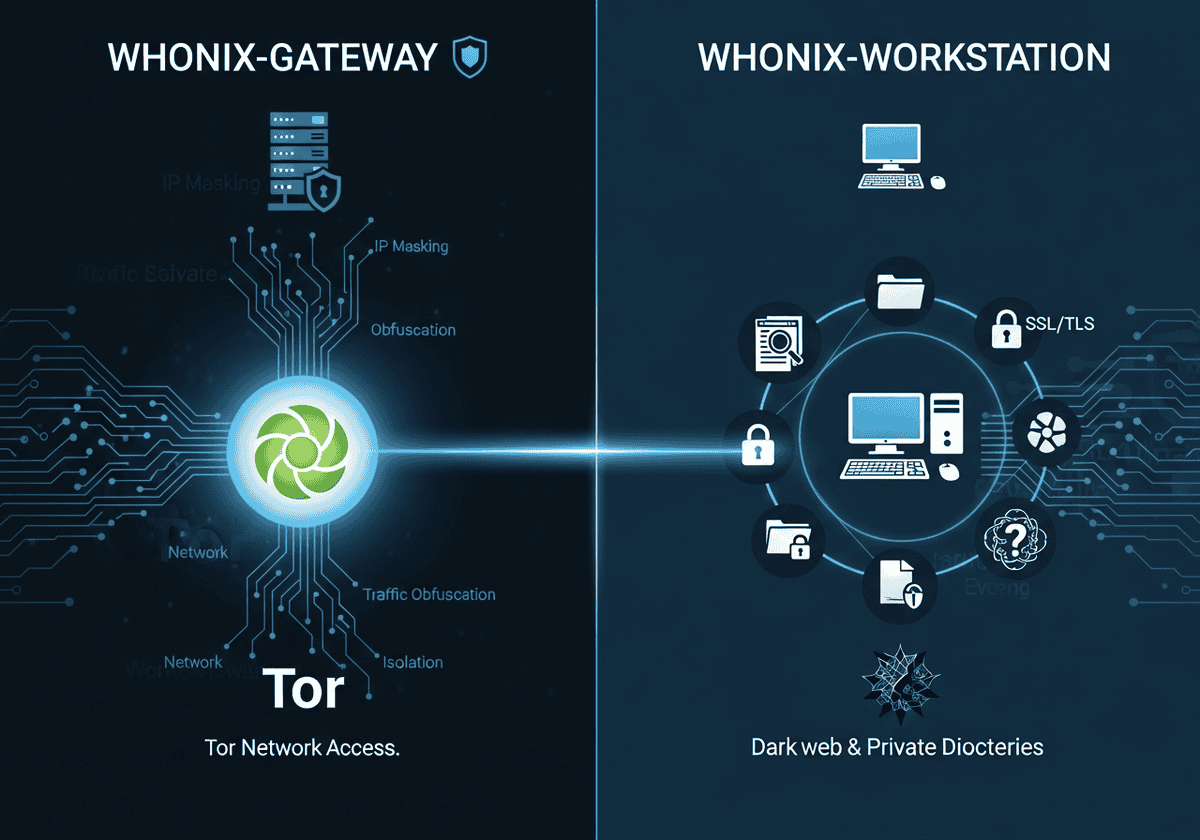
Whonix is a specialized, Debian-based operating system designed for advanced anonymity and security through a unique dual-virtual machine (VM) architecture. Unlike standard privacy tools that run as applications within a host OS, Whonix splits its operations into two distinct components:
- the Whonix-Gateway: runs the Tor process and acts as a transparent 대리
- the Whonix-Workstation: provides a sandboxed environment for user activities such as web browsing, document editing, and communications.

These two VMs are linked via an isolated internal virtual network, ensuring that the Workstation has no direct path to the physical network interface of the host machine and can only communicate with the outside world through the Gateway’s Tor circuit.
The primary technical advantage of this design is the mitigation of “de-anonymization” attacks and DNS leaks. Because the Workstation is architecturally unaware of the host’s real IP address or MAC address, even a sophisticated malware infection with root privileges cannot “phone home” to reveal the user’s true identity.
Furthermore, Whonix implements Stream Isolation, which ensures that different applications (such as a web browser and an email client) use separate Tor circuits to prevent identity correlation. By forcing all traffic—including system updates and background processes—through the Tor network at the operating system level, Whonix provides a “fail-safe” environment that is significantly more robust than using the Tor Browser on a standard, non-hardened operating system.
장점
| 단점
|
The rest of this article is reserved for members
To limit scraping bots (currently 40,000 hits per day!),
we had to restrict access to full articles and tools to registered members only.
to access all the rest.
자주 묻는 질문
What is the core architecture of Whonix?
Whonix uses a dual-VM design consisting of a Gateway that handles all Tor connections and a Workstation for user applications. This separation ensures that the Workstation never knows the user’s real IP address or hardware serial numbers.
How does Whonix prevent IP leaks even if an application is compromised?
Since the Workstation has no direct access to the internet and can only communicate through the Gateway, even root-level malware cannot discover or broadcast your real IP. All traffic is forcibly routed through the Tor network by the Gateway’s firewall rules.
Why does Whonix use two separate virtual machines instead of one?
Using two VMs creates a “security by isolation” barrier that prevents network-level leaks and local hardware identification. If the application layer in the Workstation is breached, the network layer in the Gateway remains isolated and secure.
Can I use Whonix if my host operating system is infected with malware?
No, because the host operating system and its hypervisor have total control over the virtual machines. If the host is compromised, an attacker can log keystrokes, take screenshots, or manipulate the Whonix VMs directly.
How is Whonix different from the Tails operating system?
Tails is a live “amnesic” OS designed to leave no trace on a computer’s hard drive, while Whonix is designed for persistent use within a virtualized environment. Whonix offers stronger protection against certain types of de-anonymization attacks due to its split-VM architecture.
Is it safe to use a VPN with Whonix?
While possible, adding a VPN increases complexity and can potentially introduce new attack vectors or “tunnel vision” risks. It is generally only recommended for advanced users who need to hide Tor usage from their ISP or access services that block Tor.
What is “Stream Isolation” and why is it important in Whonix?
Stream isolation forces different applications to use separate Tor circuits so that their traffic cannot be easily correlated by an exit node. This prevents an observer from linking your web browsing session to your background email syncing or other activities.
Why is the system time in Whonix different from my local time?
Whonix는 UTC와 sdwdate라는 도구를 사용하여 다음을 통해 시간을 안전하게 동기화합니다. onion services rather than insecure NTP servers. This prevents “time attacks” where an adversary uses clock skew or local time zones to identify your physical location.
Can I run Whonix on a USB drive like Tails?
Whonix is not primarily designed as a live bootable USB, though it can be installed on an external drive and run via a host OS. For a true “plug-and-play” amnesic experience on any hardware, Tails remains the standard choice.
Does Whonix protect me from browser fingerprinting?
Whonix includes the Tor Browser, which is specifically patched to provide a uniform fingerprint shared by millions of other users. By running it within the standardized Workstation environment, you further reduce the unique hardware identifiers available to websites.
Why is it discouraged to run a Tor client inside the Whonix-Workstation?
Running “Tor over Tor” creates a nested circuit that significantly degrades performance and can lead to unpredictable routing behavior. It does not provide “double anonymity” and may actually make your traffic patterns more distinct to network observers.
Related Readings & Concepts (experts)
- Tor network: a decentralized anonymity network that routes your traffic through three random relays to conceal your identity and location from observers.
- Virtualization: the technology used to run Whonix’s two-VM architecture, providing a layer of separation between the guest operating systems and your physical hardware.
- Operational Security (OpSec): the set of habits and procedures you must follow to prevent revealing your identity through behavioral patterns or accidental data leaks.
- Pseudonymity: the use of a persistent but non-identifying alias, which requires careful management in Whonix to avoid linking different online identities together.
- Stream isolation: a feature that forces different applications to use different Tor circuits, preventing an observer from correlating your activities across various services.
- Transparent Proxying: a mechanism where the Gateway automatically intercepts and routes all Workstation traffic through Tor, even for applications not natively configured for it.
- DNS leak: a security flaw where your domain name requests bypass the anonymity network, potentially revealing your browsing history to your ISP.
- IP leak: a critical failure where your real, deanonymizing IP address is exposed to a destination server or an eavesdropper.
- Browser fingerprinting: a tracking technique that identifies you based on unique browser configurations, which Whonix mitigates by providing a standardized environment.
- Tor over Tor: a problematic configuration where a Tor client is run inside a system already routed through Tor, which can lead to performance issues and unpredictable security risks.
- Tor bridges: private Tor relays that are not listed in the public directory, used to bypass censorship in regions where the Tor network is blocked.
- Entry guards: the first relays in a Tor circuit that are specifically chosen for their long-term stability to protect users against certain types of deanonymization attacks.
- Onion services: websites or services that end in .onion and are hosted entirely within the Tor network, providing 엔드투엔드 암호화 and metadata protection.
- Identity correlation: the risk of an adversary linking different sessions or accounts to the same person by observing shared identifiers or consistent behavioral traits.
External Links on Whonix
국제 표준
(링크 위에 마우스를 올려놓으면 콘텐츠에 대한 설명을 볼 수 있습니다.)