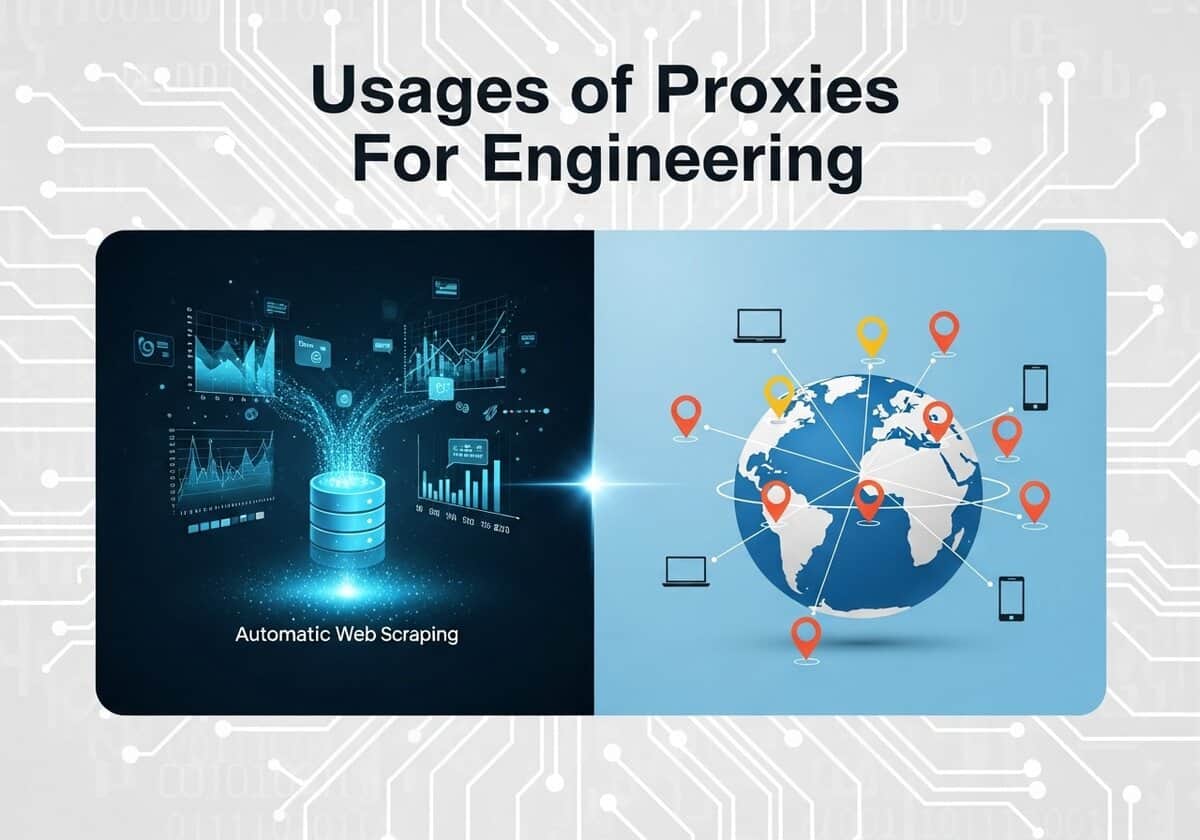
In engineering and science, progress is now often driven by the ability to gather, process, and analyze vast amounts of data. Proxies, and by extension open proxies, serve as indispensable tools in this data-centric activity, primarily by enabling automated data collection and global-scale testing. Scientists and engineers frequently need to collect large public datasets from web sources for research, such as gathering climate data from government websites, compiling linguistic corpuses from online forums, or aggregating market data to train economic models. A single IP address making thousands of requests would be quickly blocked, but by routing traffic through a pool of proxies, these automated scripts can run uninterrupted.

The utility of proxies extends beyond data gathering into the critical phases of testing and verificação. For software engineers developing applications for a global audience, proxies are essential for simulating user experiences from different geographical locations. By using a proxy located in Japan, a developer in Germany can test website localization, verify ad placements, and measure application performance as if they were a local user. Similarly, network engineers can use external proxies to test the robustness of their own firewall configurations.
This specific article is a complementary reading to the OSINT article:

Readers will also benefit from our free continuously-updated proxies list:

What Is A Proxy ?

An internet proxy, often referred to as a proxy server, acts as an intermediary gateway between a user and the internet. When a user connects to the internet through a proxy, their web requests are first sent to the proxy server. The proxy server then forwards this request to the website or online resource on the user’s behalf, using its own IP address. This process effectively masks the user’s original IP address, providing a layer of anonymity and making it appear as though the proxy server is the one making the request. The website sends the requested information back to the proxy, which then forwards it to the user. This fundamental process of routing traffic through a third-party server is the core of how internet proxies function.
The use of internet proxies offers several key benefits related to security, privacy, and performance. By hiding a user’s true IP address, proxies enhance online privacy and can help bypass geographic content restrictions. In a corporate or organizational setting, proxies are often used as firewalls and web filters to control internet usage and block access to malicious or inappropriate websites. They can also improve network performance by caching (storing) frequently accessed web pages, which allows for quicker access on subsequent requests. Overall, by acting as a middleman, a proxy server provides users and organizations with greater control over their internet traffic, bolstering security and privacy in the process.
Open Proxies “Quality” Levels
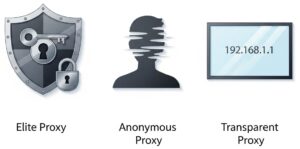
Open proxies are categorized into different “quality” levels based on the degree of anonymity they provide to the user. These levels are determined by how the proxy server handles the client’s IP address and other identifying information when forwarding requests to a web server. The three primary levels of open proxies, distinguished by their anonymity, are Elite Proxies, Anonymous Proxies, and Transparent Proxies.
Note that what is described below are the usual defined features and behaviors (when no error, nor special trick, nor malicious features …).
1. Elite ProxiesLevel 1 – High Anonymity Often referred to as High Anonymity proxies, Elite proxies offer the highest level of privacy. When using an elite proxy, the target server cannot detect that a proxy is being used. These proxies should not forward any information that could identify the user, such as the original IP address. They achieve this by stripping out all identifying headers from the user’s request.
| 2. Anonymous ProxiesLevel 2 – Medium Anonymity Anonymous proxies, also known as distorting proxies, provide a moderate level of anonymity. They successfully hide your real IP address from the target server, but they do reveal that the request is being made through a proxy. This is typically done by adding a `Via` header to the request or by sending the proxy’s IP address in the `X-Forwarded-For` header.*
|
3. Transparent ProxiesLevel 3 – No Anonymity Transparent proxies, also called “intercepting proxies“, do not provide any anonymity to the user. They pass along the user’s real IP address in the `X-Forwarded-For` header and also identify themselves as a proxy server. These proxies are often used for caching data to speed up access to frequently visited websites or by organizations to filter content.
| Any of the anonymity types above can be either public or private. For comparison: Private ProxiesA private proxy is an IP address that is normally exclusively assigned to a single user or a small, authorized group. The underlying technology is the same as other proxies; it can be configured as an Anonymous or Elite proxy, the difference being the business model: because you are the only user, you have full control over the traffic being sent through that IP address (note: depending on service and provider quality):
Primary use cases: business-critical and high-stakes tasks. This includes managing high-value e-commerce or social media accounts, large-scale and continuous data scraping for business intelligence, and any automated task where performance, reliability, and a pristine IP reputação. |
Proxy Protocols
Distinct from the anonymity levels (like Elite) or access models (like Private), there are different technical protocols that define how proxies work. Here is a breakdown of these types and applications:
HTTP/HTTPS ProxiesThis is the most common type of proxy, designed specifically for web traffic. It operates at the Application Layer (Layer 7) of the OSI model, meaning it understands the HTTP protocol. “WEB” proxy is a general term for an HTTP/HTTPS proxy, and “CONNECT” is the specific command it uses to create a secure tunnel for HTTPS traffic. WEB Proxy: works only with HTTP (not HTTPS).
CONNECT Proxy: supports tunneling of traffic, especially for HTTPS. After the tunnel is established, the proxy just forwards bytes between client and server, without inspecting them.
Use cases: general web browsing, web scraping, content filtering, and caching. Limitations: can only handle web traffic (HTTP, HTTPS, and sometimes FTP). It cannot handle traffic for gaming, email clients, or most other applications. | SOCKS ProxiesSOCKS (Socket Secure) is a more versatile and lower-level protocol than HTTP. It operates at the Session Layer (Layer 5) of the OSI model. It is “protocol-agnostic,” meaning it doesn’t understand the data passing through it; it simply creates a circuit and relays any type of internet traffic. SOCKS4: this is the older version of the protocol.
SOCKS5: this is the modern, more secure, and more capable version. It is the preferred choice.
|
Transparent ProxyA proxy that intercepts your connection without requiring any configuration on your device. It’s “transparent” because you may not even know you are using one. It is implemented at the network level by a router or firewall. All traffic from a network (e.g., a corporate office, a escola, or a public Wi-Fi hotspot) is automatically routed through it.
| Reverse ProxyThe opposite of a regular (“forward”) proxy: instead of acting on behalf of a client (user), a reverse proxy acts on behalf of a server or group of servers. It sits in front of one or more web servers. All incoming requests from the internet are sent to the reverse proxy first. The proxy then decides which backend server should handle the request. To the outside world, it looks like there is only one server.
|
| Protocol / Layer | Key Feature | Common Use Case | |
| HTTP Proxy | HTTP / Layer 7 | Understands web traffic, can cache content. | Basic web browsing, scraping. |
| HTTPS Proxy | CONNECT / Layer 7 | Creates a secure, uninspected tunnel for HTTPS. | Secure web browsing. |
| SOCKS4 Proxy | SOCKS / Layer 5 | TCP traffic relay, no authentication. | Older applications, simple tunneling. |
| SOCKS5 Proxy | SOCKS / Layer 5 | Supports TCP & UDP, authentication, remote DNS. | Gaming, streaming, torrenting, high-privacy tasks. |
| Transparent Proxy | Network Level | Intercepts traffic automatically, no user setup. | Corporate/school content filtering. |
| Reverse Proxy | Lado do servidor | Manages requests for servers. | Load balancing, security, SSL termination. |
“Free” & “Open” Proxies Myths
Organizations rarely host open proxies voluntary.
Organizations almost never intentionally provide “open” proxies for public use due to the significant security and legal risks involved. An open proxy is a server that allows any user on the internet to route their traffic through it without authentication. While this can offer anonymity and a way to bypass geo-restrictions for the end-user, for the organization hosting it, it presents a serious threat.

The vast majority of open proxies on organizational servers are a result of misconfiguration, where a proxy intended for internal use is accidentally exposed to the public internet.
These unintentionally open servers become attractive targets for malicious actors. They can be exploited for a range of illegal activities, including hiding the origin of cyberattacks, distributing malware, sending spam, and conducting phishing campaigns. The organization whose server is being used for these purposes can suffer from a tarnished IP reputation, leading to their legitimate traffic being blocked by other networks and services. Furthermore, they could face legal consequences and significant bandwidth costs from the unauthorized use of their resources.
In extremely rare and specific cases, an organization might intentionally run a publicly accessible proxy. A primary example is for security research, where an open proxy acts as a “honeypot” to attract and study the behavior of cybercriminals. Some academic or non-profit institutions in the past may have run open proxies to promote internet freedom and help users bypass censorship. However, due to the high potential for abuse and the associated risks, this practice is now virtually obsolete.
Ultimately, the presence of an open proxy on a company’s server is a strong indicator of a security vulnerability rather than a deliberate service offering. The risks of facilitating anonymous and potentially malicious traffic far outweigh any perceived benefits for the organization.
Expert tip: as said above, it can be the result of a misconfiguration. One shall also remember the famous marketing say: “If a product is free, then you are the product“. If your life relies on anonymity, do not rely on proxies unless you know precisely its origin (and use at least the “Elite” level described above).
Open Proxy vs. VPN
At a glance, open proxies and Virtual Private Networks (VPNs) might seem similar, as both can mask your IP address and reroute your internet traffic. However, the technical distinctions between them lead to vastly different implications for your security, privacy, and online freedom. The fundamental difference lies in encryption and the level at which they operate within your system.
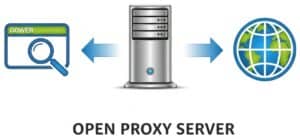
An open proxy is a server that acts as a simple intermediary for your web requests. When you configure your browser or another application to use a proxy, your traffic for that specific application is sent to the proxy server, which then forwards it to the intended destination on the internet. This process hides your real IP address from the websites you visit. However, a crucial technical drawback of most open proxies is the lack of encryption. This means that while your IP address might be hidden from the destination website, the data you send and receive can be intercepted and read by the proxy server’s operator or anyone monitoring the traffic between you and the proxy. Furthermore, proxies typically operate at the application layer (Layer 7) of the OSI model, meaning they only handle traffic from the specific applications configured to use them, leaving the rest of your internet traffic exposed.

In contrast, a VPN provides a far more robust and secure solution by creating an encrypted “tunnel” for all your internet traffic. When you connect to a VPN, it encrypts all the data leaving your device, not just the traffic from a single application. This encrypted data is then sent to the VPN server, which decrypts it and forwards it to the final destination. This almost de ponta a ponta encryption ensures that your Internet Service Provider (ISP), network administrators, or malicious actors cannot snoop on your online activities. Technically, VPNs operate at a lower level of the OSI model, typically the network layer (Layer 3) or data link layer (Layer 2). This allows them to capture and encrypt all network traffic from your device, providing a comprehensive security blanket.
Weighing the Risks and Benefits
The choice between an open proxy and a VPN comes down to a trade-off between cost, convenience, and security.
| Open Proxies | VPNs | |
| Benefits | The primary, and often sole, benefit is that it is typically free to use. They can provide a quick and easy way to bypass simple geo-restrictions or hide your IP address for non-sensitive browsing. | The foremost benefit of a VPN is security through strong encryption. This makes it safe to use public Wi-Fi and protects your sensitive data from being monitored. VPNs also offer a higher level of privacy and anonymity, as they hide your IP address and encrypt your entire internet connection. Reputable VPN services offer reliable connections with servers in numerous countries, providing a more effective way to bypass censorship and geo-blocking. |
| Risks | The risks associated with these ones are substantial. Since they are open to anyone, they are frequently used for malicious activities, which can lead to the proxy’s IP address being blacklisted, rendering it useless for accessing many websites. More alarmingly, the lack of encryption means your data, including passwords and personal information, can be easily intercepted and stolen by the proxy operator or other malicious users on the same server. Many open proxies are also unintentionally misconfigured servers, making them unstable and unreliable. | O principal risco associado a uma VPN reside na confiança que você deposita no provedor de VPN. |
The rest of this article is reserved for members
To limit scraping bots (currently 40,000 hits per day!),
we had to restrict access to full articles and tools to registered members only.
to access all the rest.